What is the Drake Burning Bridges AI trend?
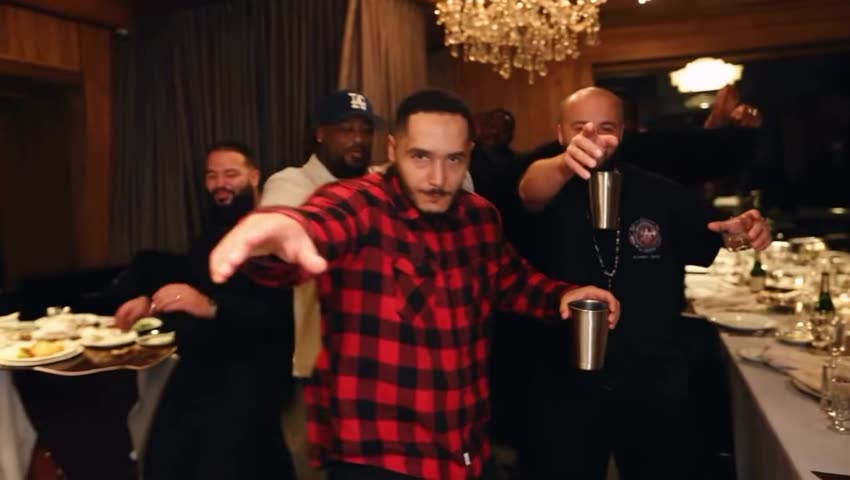
It is a wave of short AI videos built on one scene: Drake's party from the "Burning Bridges" video, with someone else at the center. People put themselves, friends, film characters and cartoon heroes in his spot and keep the song playing underneath. The clip on vswp is one of those versions, with a man in a red-and-black plaid shirt, so you swap yourself into a ready scene instead of building one.
Because only the host changes, the joke works with anyone: a friend who always ends up at the center of the party, a birthday person, or you, raising a cup in a room full of guests.
Where does the original video come from?
"Burning Bridges" is a song by Drake from his album "Iceman", released on May 15, 2026, with the official music video out the same day. The track, widely read as a diss aimed at A$AP Rocky, reached No. 13 on the Billboard Hot 100.
Toronto media reported that the video was shot in the private dining room of Sotto Sotto, an Italian restaurant in the city's Yorkville area, with Drake surrounded by friends and a cameo from former MuchMusic VJ Matte Babel. AI versions of the party scene spread on TikTok and Threads in September 2026, with swaps ranging from people's own faces to well-known characters.
The vswp clip is a fan-made AI version, not the official video, so this page links no original source.
Who and what is in it?
One person to replace: the man in front. The clip is horizontal and about 30 seconds long, with the song playing throughout.
- The host. Short dark hair, a red-and-black plaid shirt and a metal cup in his hand. He dances close to the camera, waves and points at it, raises the cup and at one moment holds a hand over his eyes as if scanning the room, the trend's signature move.
- The guests. Men behind him in caps, hoodies and T-shirts, some holding drinks, one covering his face with his hands. They stay as in the clip.
- The room. Dark curtains, a crystal chandelier and warm, low party light, as in Drake's video.
How to make the Drake Burning Bridges AI video
- Open Drake Burning Bridges AI and sign in with Telegram, no password needed.
- The host is already found: give his card one photo (JPEG, PNG or WebP).
- Check your photo: a clear face and visible body help define your appearance. The AI redraws the lead dancer using the clip's movement; clothing details can vary.
- Press "Make the free preview": about 5 seconds at 480p with a small "vswp.app" mark. Every new user gets one.
- Press "Create the full video". The price in Telegram Stars is shown before you start, and the Stars come back if a render fails or is canceled.
- Download the MP4 at 480p or 720p with the original sound, typically ready in minutes, or share it.
By starting a video you confirm you have the right to use it and the photos, so ask a friend before you make them the center of Drake's party. Other clips are in the trends list.
Which photo for the host?
- A clear, front-facing face. He looks straight into the camera for most of the clip, so the face carries the result: a sharp photo in good light, with no sunglasses or hand over the face.
- Your appearance. Use a photo of one person with the body clearly visible. If clothing matters, show it clearly too, then check the preview: an exact copy of the outfit is not guaranteed.
- Hair. Choose a photo where your hairstyle is clearly visible to give the AI a useful reference.
- The cup and the guests. The cup near his body and the people moving behind him are hard spots for generative AI, so hands and likeness can need another take.
More tips: which photos work best for an AI video swap and what to do if the face doesn't look like you. Then make another version with a friend's photo.
 Arm Wrestling AI — Skinny vs Muscular
 APT MV — ROSÉ & Bruno Mars AI Trend
 The Train Trend — run after your phone on the subway
 Red Outline — the glowing lip-sync trend
 Money Flex — the RIO FREE money trend
 Spider-man Sigma