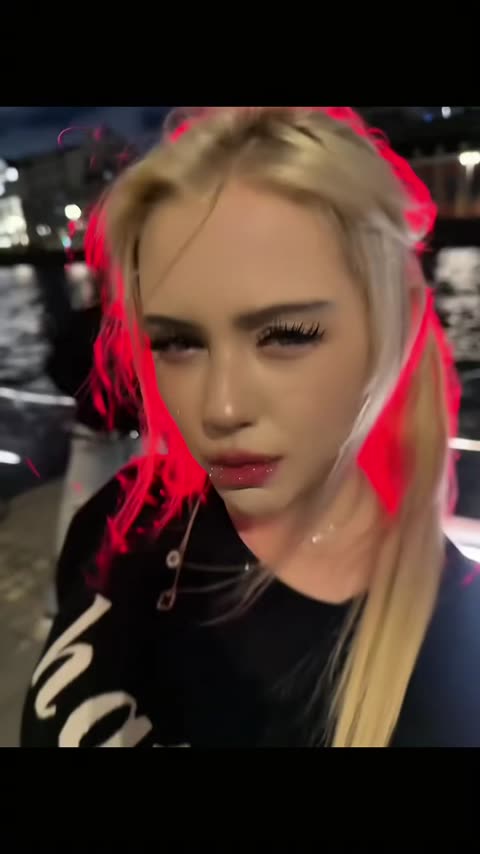
What is the Red Outline trend?
It is a lip-sync with one strong effect. The girl barely moves: she tilts her head, looks down into the lens and mouths the words with a cool, almost bored face, while a bright red contour traces the edge of her hair and shoulders against the dark city. The outline turns an ordinary night selfie into something that looks like a music video.
That is why it works as an AI template. You don't need to know the words or be good on camera: the attitude, the timing and the glow are already in the clip. Put in yourself, your friend who never posts selfies, or someone who would never sing in public, and the contrast does the rest.
Where does the original video come from?
The clip spread on TikTok as a lip-sync to a Russian-language track. Russian-speaking viewers search it by the line she mouths, «рубит, рубит из колонок» (roughly "it's pounding out of the speakers"). The red outline is an edit effect added on top of the footage, the kind of contour glow that video editors offer as a filter.
Who filmed the original, who the girl is and the exact title and artist of the song are not confirmed, so this page only describes what is visible in the clip. Treat it as a meme video, not as a music release.
Who and what is in it?
The vswp clip is 13 seconds long, vertical, and has one person to replace: the girl singing. The camera is very close, handheld and slightly tilted, so her face fills most of the frame.
- The girl. Long, loose blonde hair with lighter strands, long lashes, glossy lips, a thin chain necklace and a black top with large white lettering.
- The glow. A red neon line that hugs the edges of her hair and shoulders and flickers as she moves.
- The place. A riverside promenade at night: dark water with light reflections, a railing, and lit buildings across the river behind her.
Everything except the girl stays as in the original, including the river, the city lights and the sound.
How to make the Red Outline lip-sync with AI
- Pick one photo. Your own, or a friend's if they agreed.
- Open the trend. Go to the Red Outline trend page. The girl is already found.
- Sign in with Telegram. No password needed.
- Add the photo to her card. JPEG, PNG or WebP.
- Choose the look. With "Keep the original look" on, her black top stays and your face and hair take her place. With it off, the clothes and look come from your photo.
- Make the free preview or the full video. The preview is about 5 seconds at 480p with a small "vswp.app" mark. The full video is paid in Telegram Stars, with the price shown before you start; Stars come back automatically if a render fails or is canceled.
- Download the MP4. 480p or 720p, with the original sound, usually ready in minutes.
New to this? Start with how to put yourself in a video.
Which photo works for the Red Outline trend?
- A close, sharp face. The whole clip is a close-up, so your face is what people see. A clear, well-lit photo where you look at the camera beats a small face in a group shot.
- Your hair matters. Her long hair carries the glow. Your own hairstyle comes from your photo, so short hair, curls or a ponytail will all show, and the red line will run along a different edge.
- The edges are the tricky part. Where the red outline meets loose strands of hair is the hardest spot for any AI video; if it looks off, another take usually helps.
- Your own outfit. For your clothes instead of her black top, use a full-body photo of one person and turn "Keep the original look" off.
More tips: which photos work best for an AI video swap. Then open the Red Outline trend and start with the preview, or browse all trends.
 Money Flex — the RIO FREE money trend
 Spider-man Sigma
 Jakarta One Desire — TikTok Transition
 Bulin 47 x Kevin Wai — Dembow Dance Meme
 Hideaway — the tractor dance
 Party King