What is the Jakarta One Desire transition?
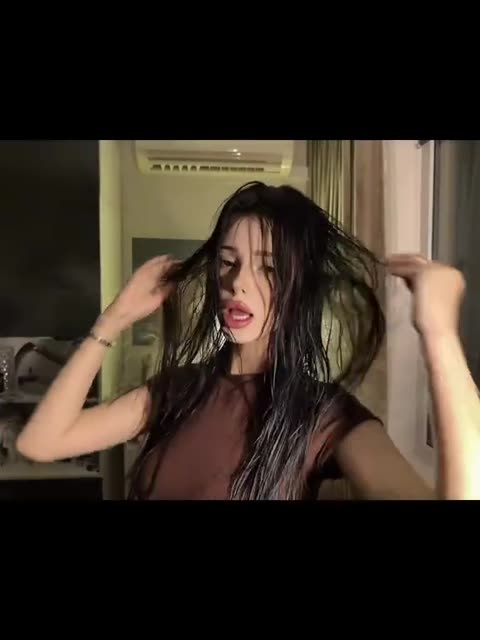
It's a "before and after" in one cut. The first half is the casual moment at home: a person in a plain top runs both hands through long, damp-looking hair, looking into the camera as if checking a mirror. Then the picture closes in, black bars squeeze the frame, and the drop of the song throws you outside into the night, as if the evening had just started.
The song carries the joke as much as the edit. One Desire is pure late-2000s French club music, the sound of the Tecktonik years, and its high, bright hook turns an ordinary room into the opening of a night out. People search for it as the Jakarta One Desire trend, the One Desire transition or simply the Mondotek remix trend.
Where does the original video come from?
The track is One Desire by Jakarta, a French electro house production team. It was their first single and a big club hit in France in 2008, where it held the number 2 spot for months. The version in the trend is the Mondotek Radio Edit, a remix by the electronic act Mondotek.
On TikTok the song came back as a retro sound for dance clips and transitions. The clip on vswp is one of these videos: filmed vertically on a phone, letterboxed, a room with an air conditioner on the wall, then a night street. Who posted the first version of this exact transition has not been confirmed, so this page describes only what the clip shows.
Who and what is in it?
One person to replace. The clip runs about 15 seconds:
- The room. A young woman with long dark hair that looks freshly washed, in a sleeveless brown top and a thin bracelet, lifts her hair with both hands and looks into the lens. Behind her: a white air conditioner, curtains, a shelf. The light is warm and low.
- The narrowing. The frame tightens with black bars at the top and bottom, which is the cue for the cut.
- The night street. The video switches to a street after dark, the second half of the transition, timed to the song.
The vswp template replaces the whole visible character, hair and clothes included, with the person from your photo. It works with a woman's or a man's photo.
How to make the One Desire transition with AI
- Open the Jakarta One Desire trend and sign in with Telegram. There is no password.
- The person is already found. Give one photo (JPEG, PNG or WebP) to their card.
- Decide on "Keep the original look". On, the brown top stays and only the face and hair change; off, the clothes and look come from your photo.
- Press "Make the free preview" to see about 5 seconds at 480p with a small "vswp.app" mark; every new user gets one.
- Press "Create the full video". The price in Telegram Stars depends on the length, quality and number of people and is shown before you start; the Stars come back if a render fails or is canceled.
- Download the MP4 at 480p or 720p with the original sound, typically ready in minutes, and post it as your own transition.
By starting a video you confirm you have the right to use it and the photos. More clips are in the trends list.
Which photo works best?
- Hair matters most. The first half is all about the hair: hands lift it, it falls over the shoulders. A photo where your hair is fully visible, not tied back or cut off by the frame, gives the AI the most to work with.
- Face to the camera. She looks straight into the lens at close range, so pick a sharp, front-facing photo in good light, with nothing over the face.
- Your own outfit. Turn "Keep the original look" off and use a waist-up or full-body photo of one person to wear your own clothes in both halves.
- Hands in the hair. Fingers moving through hair are hard for generative AI; if the hands look odd, another take usually helps.
More tips: which photos work best for an AI video swap and how to put yourself in a video.
 Spider-man Sigma
 Bulin 47 x Kevin Wai — Dembow Dance Meme
 Hideaway — the tractor dance
 Party King
 Zombie Love Story — the AI zombie hug trend
 Jean Phil Gang Gang Dance