
What is the NEON duo dance trend?
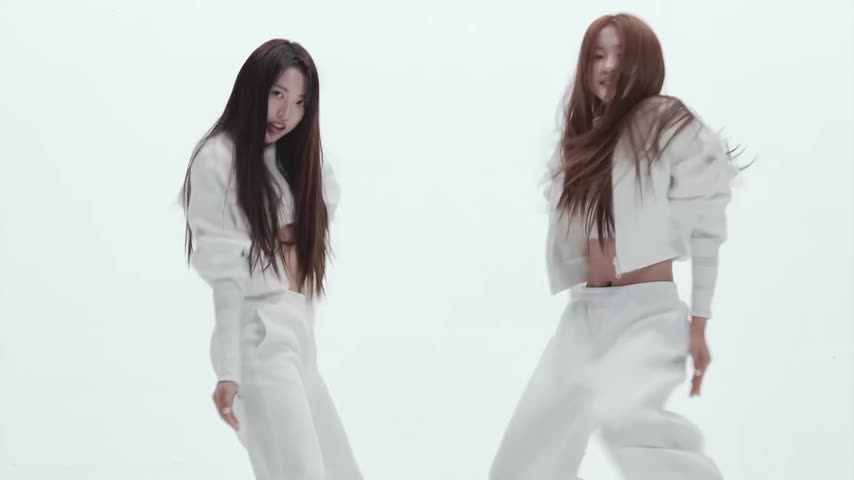
It is the first seconds of the "NEON" music video turned into a template for two people. The set is plain white, the outfits are white, and the only things that move are the dancers: long hair swinging, sharp hits on the heavy bass, the two of them mirroring each other almost step for step. Because there is nothing else in the frame, the dance reads clearly even on a small phone screen, and the clip works as a duo video for best friends, sisters or a couple.
People look for it as the NEON dance, the A2O LITE dance challenge, the "Neon and beyond" song or simply the white outfit K-pop duo dance.
Where does the original video come from?
"NEON" is the debut single of A2O LITE, a nine-member girl group from A2O Entertainment, the company founded by K-pop producer Lee Soo Man. The official music video came out on October 12, 2026 at 9:30 p.m. KST, a day before the single's release on October 13. The song is built on a heavy, booming bass line with the repeated line "Neon and beyond".
The trend's clip is the music video's opening, a little under 15 seconds, with its own sound. The group first performed the song on TV on Mnet's M Countdown on October 15, 2026.
Who and what is in it?
There are two people to replace, and you can swap one or both:
- The girl on the left. Long straight dark hair, a white cropped jacket and wide white pants. She dances facing the camera, often looking straight into it.
- The girl on the right. Long reddish-brown hair, the same white cropped jacket and wide white pants. Her hair flies around more, so it is a big part of how she looks.
The camera stays mostly wide on both of them against the white background, with a short close-up of an arm and hand. The dancing, the framing and the timing on the beat stay the same in your version; only the people change.
How to make the NEON duo dance with AI
- Open the A2O LITE "NEON" AI duo dance trend and sign in with Telegram. There is no password.
- Both dancers are already found. Give a photo to the girl on the left, the girl on the right, or both (JPEG, PNG or WebP). A dancer without a photo stays as in the original.
- Decide on "Keep the original look". On, the white jackets and pants stay and only faces and hair change; off, the clothes come from each photo.
- Press "Make the free preview" to see about 5 seconds at 480p with a small "vswp.app" mark; every new user gets one.
- Press "Create the full video". The price in Telegram Stars is shown before you start, and the Stars come back if a render fails or is canceled.
- Download the MP4 at 480p or 720p with the song, typically ready in minutes.
By starting a video you confirm you have the right to use it and the photos, so ask your friend before you put them in. For a duo with friends, see how to recreate a trend with friends; more videos are in the trends list.
Which photo for each dancer?
- A full-body photo of each person. The dance uses the whole body, and the wide white pants and hair move all the time. A head-to-toe photo carries your shape, hair and outfit best.
- Hair fully in frame. Both dancers have long hair that swings with every move. A photo where your hair is clearly visible keeps it yours; short hair works too, it just changes the look.
- One person per photo. Crop a group picture so each photo shows only the person for that role, sharp and in good light.
- Pick sides on purpose. The left dancer looks into the camera more; give that role to whoever wants the most face time.
- The outfit choice. Keep "Keep the original look" on for the matching all-white look; turn it off if you want your own clothes from the photos, which works best with full-body photos.
More tips: which photos work best for an AI video swap.