
What is the AI witch on a broom trend?
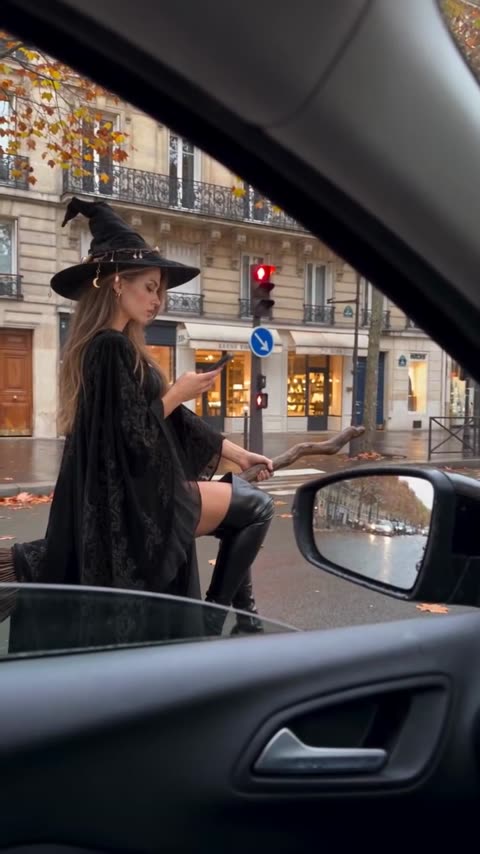
It is a Halloween joke told as an everyday commute. Nothing about the street is magical: wet asphalt, a red traffic light, a blue one-way sign, shop windows and fallen yellow leaves. The only odd thing is the neighbor in the next lane, a witch who treats her broom like a scooter and is bored enough at the light to check her phone. Then the light changes and she simply takes off.
It works because it looks like something a friend filmed through the car window. People post their versions in October as a costume post without the costume, or send them to a friend who is always "flying" late. It is searched as the witch on a broom video, the Paris witch, the witch at the traffic light, the Halloween broom trend, or the flying witch AI video.
Where does the original video come from?
The clip is AI-generated and spread as a Halloween video in October 2026. We have not confirmed who made or first posted it, so this page does not link a source. The setting is clear from the frame: a Paris street with cream stone buildings, wrought-iron balconies and ground-floor shops, on a grey autumn day.
Who and what is in it?
There is one person to replace: the witch. She has long fair hair under a wide black pointed hat with small charms hanging from the brim, a long black lace cape, and black over-the-knee boots; she sits sideways on a wooden broom. The clip moves through a few moments:
- Through the car window. The camera looks out of a passenger window, with the door handle and the side mirror in the frame, at the witch waiting on her broom next to the car.
- At the red light. She looks down at her phone, one hand on the broom handle, as cars and pedestrians wait around her.
- Takeoff. The light changes and she flies off ahead, over the road and the traffic.
The camera stays inside the car the whole time, so your version keeps the same window frame, street and timing.
How to make the AI witch on a broom with AI
- Open the AI Witch on a Broom trend and sign in with Telegram. There is no password.
- The witch is already found. Give her your photo (JPEG, PNG or WebP).
- Decide on "Keep the original look". On, the hat, lace cape and boots stay and only the face and hair change; off, the look comes from your photo.
- Press "Make the free preview" to see about 5 seconds at 480p with a small "vswp.app" mark; every new user gets one.
- Press "Create the full video". The price in Telegram Stars is shown before you start, and the Stars come back if a render fails or is canceled.
- Download the MP4 at 480p or 720p with the original sound, typically ready in minutes.
By starting a video you confirm you have the right to use it and the photo, so ask a friend before you turn them into a witch. More videos are in the trends list.
Which photo works best?
- A clear face in profile and three-quarter. The witch is seen from the side, looking down at her phone, so a sharp photo where your face is well lit helps the likeness hold at that angle.
- Keep the costume. For most people the fun is the full witch look; leave "Keep the original look" on and your face and hair go under the hat.
- Your own outfit. Turn it off and use a full-body photo if you want to ride the broom in your own clothes.
- Hair under the hat. Long hair suits the shot best, but any hair works; a photo where your hair is fully visible carries it best.
More tips: which photos work best for an AI video swap.