
What is the Zany Preparaty trend?
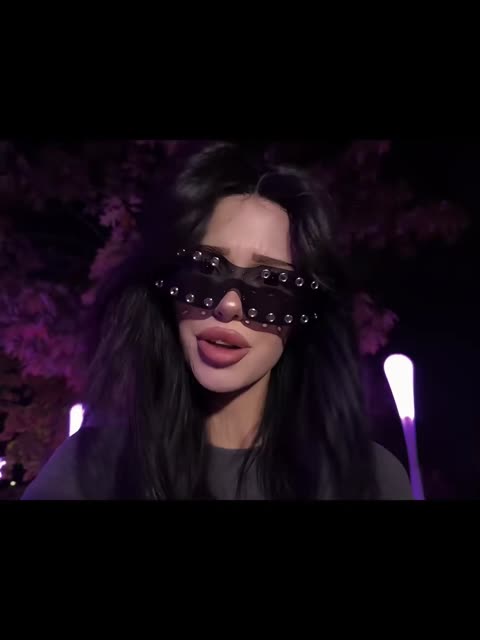
It's a mood edit rather than a dance. The camera stays close, at arm's length, and almost nothing moves except the face, the hair and the glasses. What makes it stick is the editing: the sunglasses switch on the beat, and for a moment the frame shows a see-through copy of the same person, as if a ghost were lagging a step behind. Under the heavy slowed bass it looks dreamy and a little eerie.
That also makes it hard to film yourself. You need a dark spot with colored light, a few pairs of statement glasses and an editor that lines up the switches and the double exposure. A ready clip skips all of that.
Where does the original video come from?
The sound is "заны препараты" by the artist tozz., released in "slowed" and "ultra slowed" versions; the trend uses the ultra slowed one, and people often write its name in Latin letters as "zany preparaty". On Shazam the ultra slowed version is filed under Dance.
The clip on vswp is credited on its trend page to the TikTok account @nopowerbaank. Its video ID dates the post to October 10, 2026. We could not confirm that it is the first video with this edit, so this page doesn't link a source and describes only what the video shows.
Who and what is in it?
- The girl in the selfie. The one role you replace: long dark hair, full glossy lips, a gray top and wide black visor-style sunglasses with metal studs along the frame. She looks into the camera, frowns slightly and mouths the words.
- The ghost doubles. Semi-transparent copies of her that fade in and out over the frame. In your version they carry your face too.
- The sunglasses switches. Sudden cuts where the glasses change while the pose stays the same.
- The night setting. Trees lit in purple and pink, glowing lamp posts on the right and dark sky; it stays as it is for all 12 seconds, with the original sound.
How to make Zany Preparaty with AI
- Open the Zany Preparaty trend and sign in with Telegram. There is no password.
- Give a photo (JPEG, PNG or WebP) to the girl in the selfie. Without a photo, she stays as in the original.
- Decide on "Keep the original look". On, the gray top and studded sunglasses stay and only the face and hair change; off, the look comes from your photo.
- Press "Make the free preview" to see about 5 seconds at 480p with a small "vswp.app" mark; every new user gets one.
- Press "Create the full video". The price in Telegram Stars depends on length, quality and number of people and is shown before you start; the Stars come back if a render fails or is canceled.
- Download the MP4 at 480p or 720p with the original sound, typically ready in minutes, and share it.
By starting a video you confirm you have the right to use it and the photos; ask friends before using theirs. More clips are in the trends list.
Which photo for each role?
- Face first. This is a close-up selfie, so the face fills the frame. A sharp, front-facing photo in good light matters more here than a full-body shot.
- No sunglasses in your photo. The clip adds its own glasses; a photo with your eyes visible helps the AI recognize you behind them.
- Your hair, clearly. Long hair frames the face for the whole clip, so a photo where your hairstyle and hair color are easy to see keeps them closer to yours.
- Dark light is fine. The scene is lit purple at night, and the AI matches your face to that light; your photo itself should still be bright and clear.
- Ghost moments. Semi-transparent doubles and quick cuts are hard for generative AI; if a frame looks off, another take usually helps.
More tips: which photos work best for an AI video swap and why the face may not look like you.
 Jakarta One Desire — TikTok Transition
 Hallway Strut
 Pizza Guy Rihanna
 I Feel Like Nicole — Chanel AI Trend
 Somebody That I Used to Know AI Trend — Gotye & Kimbra
 Towel Hair Flip Transition